Jabra Speak 510 Portable Speakerphone

You ask someone to repeat themselves on the phone for the third time, and it stings a little. If that sounds familiar, the BenQ treVolo U dialogue speaker may help with voice clarity. This article covers hearing phone calls clearly, computer audio, music, TV dialogue and audiobooks, plus common hearing challenges, simple setup, ways to set up your room, and using volume with care. First, a look at another speakerphone, the Jabra Speak 510.
It connects two ways: Bluetooth to a phone or tablet, or a USB cable to a laptop. It also works with Zoom, Microsoft Teams and Google Meet, so a video call with the grandkids is covered.
Jabra describes the sound as crystal clear, and the point is to hear a voice at a comfortable level without holding the phone to your ear. Setup is meant to take seconds, and it is portable, so you can move it from the kitchen table to the living room chair.
Now the trade-offs. It is built for calls and meetings, so it is not the right pick if your main trouble is hearing the TV. Its job is to carry voices from a call, not to sharpen dialogue in movies and shows.
It also won’t replace hearing aids or a hearing test if you are missing a lot of conversation in person. If a clearer speaker is what you need for calls, it is worth a look.
If TV is your main concern, you may also want to look at the SIMOLIO 621D Plus TV speaker, which was co-designed with audiologists.
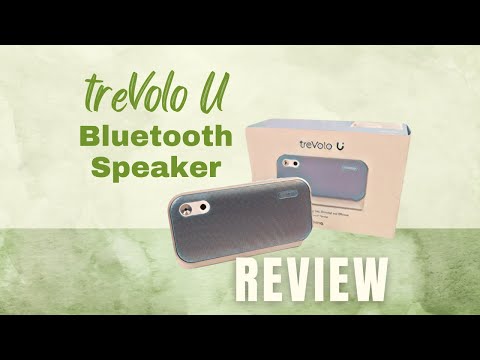
Video Guide: Full Walkthrough of the treVolo U
Watch the video to see an unboxing of the product, a demonstration of the speakerphone vs. an iPhone speakerphone, and more details on the various uses of a Bluetooth speaker.
Hear Phone Calls Clearly
This Bluetooth speaker minimizes background noise that obscures speech. It produces dialogue that is clearer and easier to hear than the speakerphone built into mobile phones and landline phones. Watch the video for a demonstration of this.
Plus, the treVolo U’s high-quality microphone picks up nuances smartphone mics miss.
You may find you say “what?” a lot less during calls.
Enjoy Crystal Clear Computer Audio
It connects by Bluetooth to phones, computers and tablets.
The proprietary treVolo Voice Engine optimizes audio from video calls, YouTube videos, audiobooks, and more for vocal clarity.
Music that Doesn’t Strain to Hear
The app has a quick listening check that adjusts the sound to your liking. It is not a medical hearing test, so see an audiologist if you are worried.
Its duo driver system (two speaker parts) boosts treble and bass for a rich, balanced sound. Some people find music easier to follow with the sound adjusted.
Understand TV Dialogue Better
The Trevolo U’s Acoustic Echo Cancellation removes distracting echo from TV audio. Its angled design projects sound directly to your ears so you can turn up the volume without disturbing others.
You won’t have to strain to hear the TV anymore. Setup is quick and easy by syncing via Bluetooth or connecting the 3.5mm audio cable.
Audiobook Clarity
The maker says the Voice Engine is tuned for spoken voices, such as audiobooks. Soft-spoken narrators and accents may be easier to follow.
You can fully immerse yourself in audiobooks and podcasts now.
The Struggle is Real: Common Hearing Challenges
Hearing loss often affects high-pitched sounds, which can make children’s voices harder to follow. An audiologist can explain what is happening for you. Background noise also complicates things by masking the sounds you want to hear.
On top of this, some device speakers don’t deliver sufficiently clear, loud sound. Some kinds of hearing loss make high-pitched voices harder to hear.
The app also lets you customize the sound profile to improve areas you personally struggle hearing, like high or low frequencies. This personalization makes a big difference.
Simple Setup, Immediate Improvement
Its Bluetooth connectivity and conferencing platform compatibility make for a quick, simple setup. The maker says setup is quick.
There are no complex menus or controls, just clear audio in minutes.
Optimize Your Listening Environment
To complement devices like the treVolo U, you should also optimize the listening environment in your home.
- Background noise from appliances, traffic, or chatter can interfere with audio clarity.
- Turn off unnecessary electronics and close windows to reduce noise distractions.
- Position yourself close to speakers and elevate devices to ear level for direct sound delivery.
- Avoid placing speakers in corners or confined spaces, which creates an echo.
- Utilize sound-absorbing furnishings like curtains and rugs to minimize audio reverberation.
- Take advantage of audio cues and enhanced subtitles on TVs.
- And invest in a pair of comfortable, noise-isolating headphones to further diminish ambient distractions.
With some simple environmental tweaks, you can enhance the benefits of the treVolo U.
Use Caution with Volume
While the treVolo U allows you to increase volume to comfortable levels, take care not to overdo it. Excessive loudness can be dangerous for your ears. Set volumes to the minimum level needed for clarity and use the treVolo’s Safe Volume Detection feature.
Take regular breaks and limit headphone usage to safe time periods. And get your hearing checked regularly to detect any changes.
By optimizing volume combined with smart listening habits, you can protect your ears while making the device audio ideal.
Infographic: Optimizing Audio for Clearer Listening

Share on Your Site With This Code:
<a href="https://grayingwithgrace.com/benq-trevolo-bluetooth-speaker-seniors/"><img style="width:100%;" src="https://grayingwithgrace.com/wp-content/uploads/2023/07/Optimizing-Audio-for-Seniors-infographic.png"></a><br>Design by: <a href="https://grayingwithgrace.com">Graying With Grace</a>
Conclusion
Hearing loss doesn’t have to keep anyone from enjoying shows, music and conversations. With a speaker like the treVolo U, you can keep taking part on your own terms.