If you have elderly parents or loved ones who haven’t necessarily embraced tech, they may be living with inconveniences that gadgets could solve.
By identifying what electronic devices could benefit them, you should be able to come up with some of the most useful gifts.
This article will detail some of the best tech gifts that you could consider giving elderly people in your life without causing any additional confusion.
If you’re short on time, the first few are what I’d buy for almost anyone on your list, and the last few are ones you probably haven’t thought of.


My Featured Gift Recommendations
Memoryboard Digital Message Board
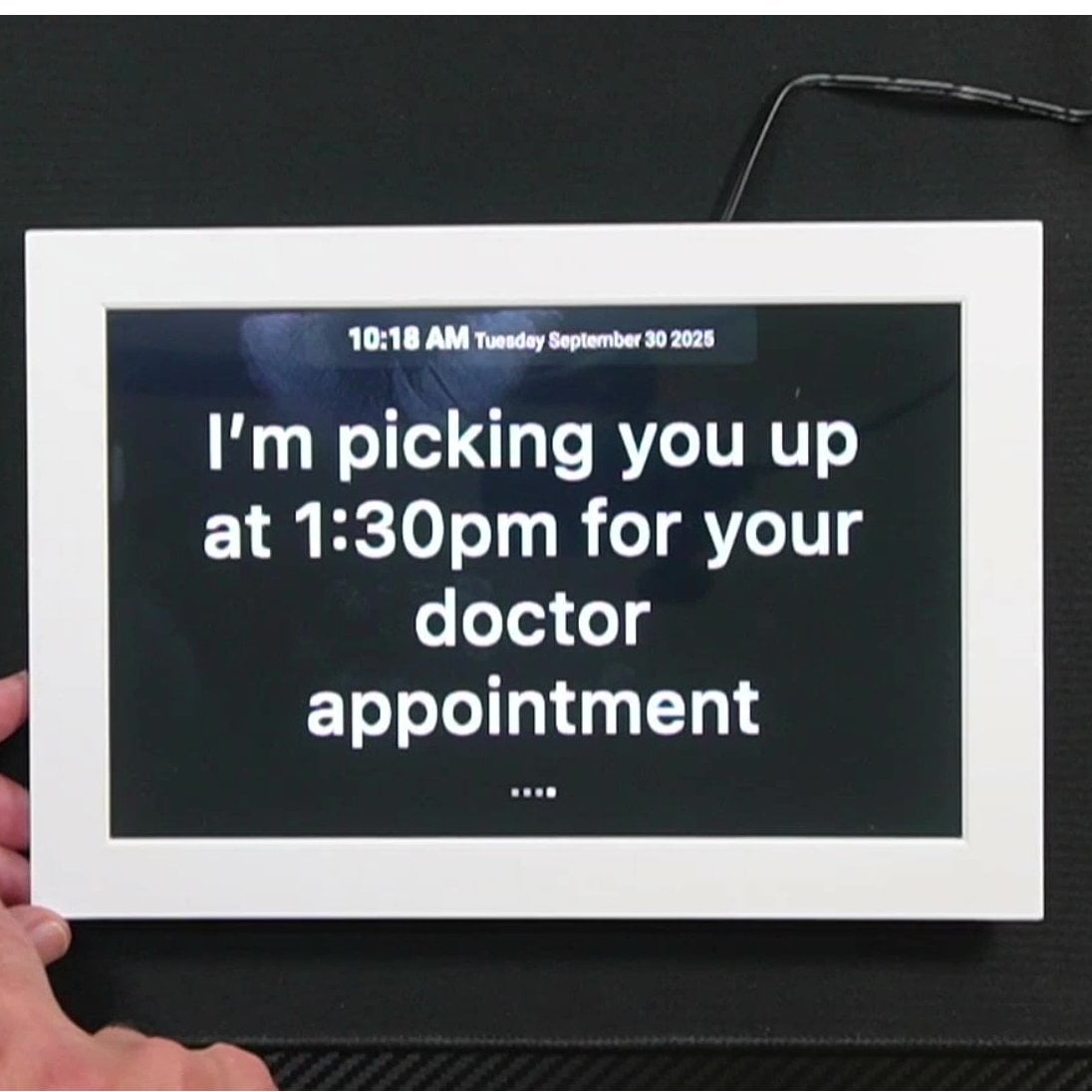
For a parent who doesn’t want to learn a new gadget, my featured pick is the Memoryboard. It’s a simple screen that shows the day and date, plus the messages, reminders and photos family members send from an app on their phones.
All the tech is on the family’s side. Your parent just glances at the screen, with no buttons to push and nothing to set up. It does need WiFi and a plug. I walk through setup and everyday use in my complete Memoryboard review.
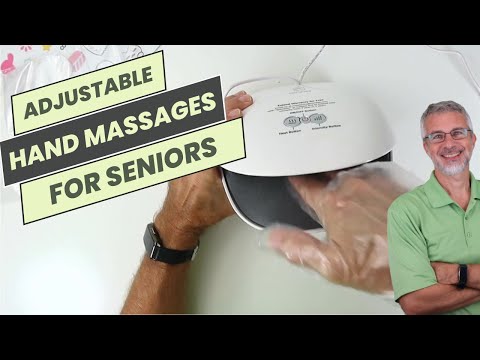
Comfier Wireless Hand Massager

This hand massager is an ideal electronic gift for elderly loved ones.
- It’s easy to use – just slip hands in and press buttons to customize massage settings.
- The auto shut-off provides safety and peace of mind.
- Its wireless, portable design allows hassle-free use anywhere.
- Most importantly, it delivers therapeutic relief from age-related hand and wrist conditions like arthritis, injuries, stiffness and poor circulation.
- The gentle heat and massage increase blood flow, reduce swelling, relax muscles, and improve flexibility and range of motion.
For simple operation, safety, and improved hand health, I highly recommend this massager.
See it in action here:

Best Electronic Gifts for the Elderly
SIMOLIO TV Speakers for Seniors

The SIMOLIO 621D Plus is a wireless TV speaker made for people with age-related hearing loss. Its Dialogue Enhancer works to pull voices out from the music and background noise, so speech is easier to follow.
The practical benefit is volume. Speech is meant to be clear at 40% volume instead of 75%, so your loved one can follow the show without the rest of the house having to hear it too.
Setup is simple. It is plug and play and takes about two minutes, with no app, no WiFi and no passwords. The controls are oversized and easy to feel, and there are 3 EQ modes to match the sound to the show.
It reaches up to 164 feet wirelessly and runs up to 8 hours on a charge. That means it can sit next to the favorite chair, follow someone to another room, or stay docked all day.
Two things to know before you buy. If the TV only has HDMI and no other audio output, you will need a separate audio converter.
It is also a single speaker, so you won’t get much stereo separation. It suits talk shows, news and dramas better than concerts or movies with big soundtracks. It is a TV speaker, so it won’t help with phone calls.
Bedsure Heated Blanket Throw

If you’re shopping for someone who is always cold, the Bedsure GentleSoft Heated Blanket Throw is worth a look. It’s a 50×60 inch ribbed flannel throw in grey, sized for draping over a lap on the couch or over the legs in a chair.
It has 6 heat levels, so the person using it can pick what feels right instead of settling for one temperature. There are also 6 timer settings (1, 2, 4, 6, 8 and 10 hours), and it shuts itself off after 8 hours by default. That’s a good feature if the blanket gets used for an afternoon nap and then forgotten.
The preheat setting is a nice touch. It warms the blanket at Level 6 for 2 hours, then drops to Level 4 for 6 hours, so nobody has to fiddle with settings. The product details say it’s ETL and FCC certified. They also say it went through 74 safety tests, and that Good Housekeeping’s 2025 lab tests ranked it among the top 3 heated blankets.
The top is 240 GSM flannel, and the underside is 200 GSM sherpa. That’s a soft fabric, though a throw this size covers a lap and legs better than a whole bed.
Keep in mind that this is an electric blanket, so it needs to be near an outlet. It also won’t suit someone who wants to cover a full bed. For that you’d want a bigger size.
AGPTEK Bluetooth MP3 Player

The AGPTEK M3 is an MP3 player with a 2.4-inch screen and a built-in speaker, so you can play music without headphones. If you’d rather listen privately, it also pairs with Bluetooth headphones or a Bluetooth speaker.
It has 64GB of built-in storage, which is a lot of songs. You can add a memory card if you ever fill it up.
Bluetooth 5.3 means it reconnects on its own to the last device it was paired with. Once your headphones are set up, you shouldn’t have to pair them again each time.
One catch: music has to be loaded onto it from a computer, and that’s a chore for anyone who isn’t comfortable with one. Plan on a family member helping with the first batch of songs. Also, a single file transfer shouldn’t be larger than 3GB, so move things over in smaller pieces.
It suits someone who wants their own music collection without a phone or a streaming subscription. If you want to ask for a song by voice or stream anything, this isn’t that kind of device.
IROGER Hearing Amplifier Device

This is a personal sound amplifier, meant for someone who struggles to catch conversation and would like things louder and clearer. It has automatic gain control, which means it adjusts the amplification on its own as sounds change, so you aren’t constantly fiddling. The maximum boost is 65dB.
The directional microphone focuses on voices in front of you and cuts down on background noise. That helps at a dinner table or across from a friend at a restaurant.
Controls are simple: one knob turns it on and off and sets the volume. No tiny buttons. It’s rechargeable, takes about an hour to charge fully, and runs up to 120 hours. It’s also lightweight and small enough to slip into a pocket or bag.
Now the downside. A sound amplifier is not a hearing aid. It makes everything louder rather than being fitted to your particular hearing loss, and it won’t be enough for someone with more serious loss. If hearing trouble is new or getting worse, a hearing test comes first.
Audiobooks Audiobook Subscription

Many seniors can benefit from an Audiobooks.com subscription: from active seniors who like to exercise to elderly people who are homebound or even bedridden. Audiobooks provide hours of entertainment, education, and enlightenment. Plus, they keep seniors’ minds busy as they pass the time.
Bose Noise Cancelling Headphones

These high-quality noise-cancelling headphones are world renowned for shutting out the world around you. Works with Amazon Alexa and Google Assistant too. Wireless and easily synced to a phone, tablet, or PC.
ECOVACS DEEBOT Robot Vacuum

This helpful little home gadget can vacuum AND mop an entire home on one charge. Works well with pet hair and features a hard floor mode. Automatic mode to always keep a home spotless.
Google Fitbit Air Activity Tracker

The Google Fitbit Air is an activity tracker with no screen at all. It tracks fitness, heart rate and sleep, and it goes about its work quietly on your wrist.
The band is one size and adjusts to fit wrists from 130 to 210 mm. It is made to be worn day and night, so it can follow your sleep as well as your walks.
Battery life is up to 7 days, and it works with both iPhone and Android. You read your numbers in an app on your phone, which is where the coaching shows up too.
Now the downsides. With no screen, you can’t glance at your wrist for your steps or the time. Someone who likes that kind of quick check may be happier with a tracker that has a display.
The personalized coaching comes with Google Health Premium, which is sold separately. A 3-month trial comes with it, and after that it’s a membership you’d need to decide on.
It suits someone comfortable with a smartphone who wants to keep an eye on activity and sleep without a gadget on the wrist demanding attention. If you want a simple tracker you can read on its own, this isn’t the one.
Lively Jitterbug Smart Smartphone
This easy-to-use smartphone for seniors has simple, list-basted menus with a large, easy-to-see screen. Even offers voice typing and mobile internet access.
KitchenAid Cordless Hand Mixer

The KitchenAid Go Cordless Hand Mixer runs on a battery, so there’s no cord to trip over and no need to stand near an outlet. You can mix at the counter, the table, or wherever is comfortable to sit.
The 12v MAX battery gives up to 60 minutes of continuous runtime. That will vary with the recipe and the attachments, and the battery wears down with age and use. The battery comes with the mixer.
It has 7 speeds. Use the slow ones to stir chunky ingredients, medium for creaming butter and sugar, and high for whipping egg whites or heavy cream.
A Soft Start feature brings the beaters up to speed gradually, which helps keep flour and batter from splattering. The mixer is also designed to stand on its own, lifting the beaters up and out of the bowl and off the counter.
The stainless steel turbo beaters are dishwasher-safe, so cleanup is easy.
One thing to know: a cordless mixer needs charging, and a battery that has run down halfway through a batch means waiting. If you bake only now and then, remember to charge it before you start.
RAZ Memory Cell Phone

This easy-to-use cell phone for seniors features photo dialing, an emergency button, and displays the time, remaining batter, and signal strength. And, that’s it! Plus caregivers can manage and control the phone settings through a simple portal.
EZclicker TV Remote for Seniors
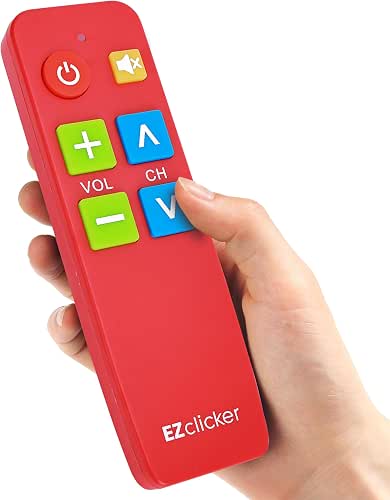

Most remotes have far more buttons than anyone needs. One wrong press and the TV is stuck on a settings screen nobody can get out of.
The EZclicker TV Remote strips all that down to 4 big buttons. It’s meant for older adults, people with low vision, and people with dementia, who often get lost in the clutter of a standard remote.
The large buttons also help if your hands are stiff or your eyesight isn’t what it was. I’ve used this one, and it’s the sort of gift an adult child can buy for a parent and have it make sense right away.
Two things to know. It works with major TV brands, but not every TV, so check yours before you order. And the 2 AAA batteries aren’t included, so keep a pair handy or the gift will sit there doing nothing.
It’s also not for anyone who wants to browse streaming apps or change settings. Four buttons means four jobs, and that’s the point.
Audiocrazy Vintage Radio with Clock


This walnut-finish clock radio does three jobs at the bedside: alarm clock, AM/FM radio, and Bluetooth speaker. No apps and no streaming accounts to deal with. If you want more options, I also have a guide to a simple radio for seniors.
It holds 80 AM/FM presets, so favorite stations stay saved and nobody has to retune every morning. The display is a clear LCD, and the tap-to-snooze and sleep timer are handy at bedtime.
Bluetooth needs no app either. The radio shows up in the phone’s device list, and you connect from there.
The trade-off is the first setup. Saving presets and setting the alarm takes some patience, and a family member may need to help the first time. Also, a power flicker could reset the clock, so it’s not the best fit if you want something you never have to touch again.
YARRAMATE Electric Can Opener


This electric can opener is my pick for older adults who struggle with a manual one. You press a single button and it starts, then stops when it’s done. No gripping, no twisting your wrist.
That matters if arthritis or weak hands make a hand-crank opener painful. The opener does the work, so your hands don’t have to.
It cuts along the side of the can, which leaves a smooth edge on both the can and the lid. That lowers the chance of a nasty cut on a sharp rim.
It recharges with a USB-C cable (included), so there are no batteries to keep buying. The trade-off is that you do have to remember to charge it.
It takes a few seconds per can, so it isn’t instant, though most people won’t find that slow. It also won’t work on pull-tab cans, cans that aren’t round, or cans with a damaged rim. If those are what your person opens most, this isn’t the right one.
ASAKUKI Essential Oil Diffuser

An aromatherapy diffuser is a wonderful way to release a healthful mist into the air. This gift will transmit at various settings, so you can let it run for 6-8 hours with a tank of water. Anyone who lives in a home with a furnace or heating system that dries out the air needs a humidifier to put some moisture back into the air. And what better way to do that than with favorite aromas too.
Beurer Electric Nail Drill
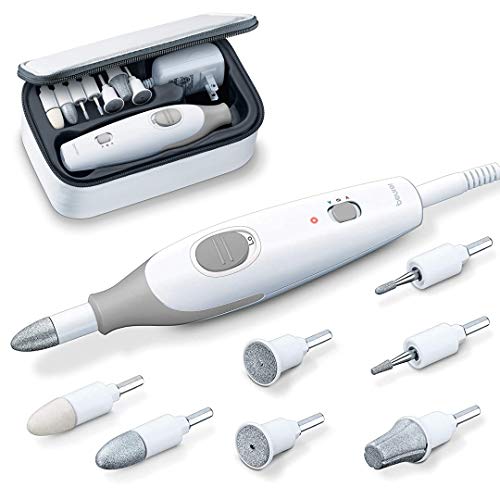
When the weather is too cold or mobility is a problem, this at-home kit is an ideal solution. Trimming in-grown toenails and calluses can be dealt with from the comfort and privacy of the home. The kit has all of the pieces needed for a manicure or pedicure. Plus, it includes an instructional guide that explains when/where to use each of the attachments. An LED light is built in to see the nails better. Consider adding to this gift with a small set of nail polishes, nail polish remover, and toe separators so that they can paint their nails too.
innioasis Bluetooth MP3 Player

A senior friendly MP3 player suits an older adult who loves music, or a relative who likes gadgets. Music can bring back good memories, keep the mind engaged, and give people something to share with those around them.
The innioasis G1 has 80GB of storage. You can load it with a favorite library ahead of time and play it offline, in formats like MP3, WAV, FLAC and AAC.
It also connects over WiFi and Bluetooth, and it comes with Spotify, Pandora, TIDAL and Deezer already on it. Audible and Libby are included too, so it handles audiobooks and e-books as well as music. It has an FM radio and a voice recorder, which is handy for someone who still likes to tune in to a station.
The trade-off is that it does a lot. Streaming apps need a WiFi connection and an account with each service, so someone will probably need to help with the setup. If the person you are shopping for just wants to press one button and hear their old records, a simpler player will serve them better.
Amazon Fire HD Tablet

The Amazon Fire HD 10 is a tablet with a 10.1″ Full HD screen. That is a good-sized screen for reading, watching shows, and seeing a family member’s face on a video call.
It has a 5 MP front-facing camera, so it works with Zoom for chatting with family when you are apart. You could set up the account and the call app ahead of time, so all they have to do is tap and say hello.
It also works as an e-reader. You can load some of their favorite books before you hand it over, and it is a nice way to keep them close at hand.
The battery is rated at 13 hours, so it does not need charging every day. The design is thin, light, and durable, with strengthened glass, which helps if it ever gets bumped. It comes with 32 GB of storage, and a micro-SD card (sold separately) can add more.
One thing to know: a tablet does more than a plain e-reader, and that can be a lot of buttons and apps for someone who just wants to read. If that sounds like your person, a simpler device may suit them better. If they would enjoy books, shows, and video calls all in one place, this one fits.
Soundcore Noise Cancelling Headphones

Wireless headphones let your loved one enjoy the TV, an audiobook, or just shut out the noise around them for a while. This pair uses noise cancelling, which means built-in microphones pick up background sound and work to cancel it out. That can help in a busy common area or a house with the TV going in the next room.
The battery runs 40 hours with noise cancelling on and 60 hours with it off. A quick 5-minute charge gives about 4 more hours of listening, which is handy for anyone who forgets to plug things in. They connect by Bluetooth to two devices at once, so someone could switch between a phone and a tablet without re-pairing.
One thing to know: Bluetooth headphones need to be paired with a phone, tablet, or TV that supports it, and someone may need to help with the first setup. They also aren’t ideal for a person who needs to hear the doorbell or a caregiver calling from another room. Noise cancelling does what it says.
For more on choosing a pair, see my guide to buying headphones for seniors and the elderly in this article.
Glocusent Rechargeable Reading Light

This book reading light charges in a USB port so it can be plugged right into a tablet or kindle device to help seniors see better while reading. There are multiple color modes and brightness levels including a night light setting. The best part is that it slips easily around the neck – no difficult to use clamps to cause pain for arthritic hands.
Keurig Single Serve Coffee Maker

For a lot of us, the day doesn’t really start until that first cup of coffee. The Keurig K-Express makes one cup at a time, so there’s no pot to brew and no half a pot going bitter on the burner.
You drop in a K-Cup pod and pick a size: 8, 10, or 12 ounces. There’s also a strong brew setting if the morning calls for a bolder cup.
The water tank is removable and holds 42 ounces, enough for up to 4 cups before you refill it. That means fewer trips to the sink. The machine shuts itself off 5 minutes after the last brew, which is handy if someone forgets.
The drip tray comes out to fit a travel mug up to 7.4 inches tall.
One thing to know: it runs on K-Cup pods, and those add up over time. If that bothers you, it works with the My K-Cup Universal Reusable Coffee Filter, so you can brew your own ground coffee. The filter is sold separately.
It’s also not the best fit for someone who brews a full pot for a crowd. It makes one cup at a time, so it suits a person who drinks coffee mostly on their own.
Esky Key Finder Locator

Featuring a transmitter kept at one location and six receivers that can be attached to car keys, house keys, remote controls, phones, or whatever else you might frequently lose or misplace. Hit the button, hear the loud beeps, and find what you’re missing!
Amazon Echo Dot Speaker

The Amazon Echo Dot is a speaker you talk to. Ask Alexa to play music, audiobooks, or podcasts from Amazon Music, Apple Music, Spotify and others, or send sound to it over Bluetooth.
It also handles the small everyday questions. Ask for the weather, set a timer without lifting a finger, get an answer to something you’re wondering about, or hear a joke. If you want a few more minutes in bed, tap the top to snooze the alarm.
It can run compatible smart home devices by voice too. Built-in motion and indoor temperature sensors can trigger routines, like turning on a light when someone walks into a room or starting a fan when it gets warm. That helps with a dark hallway at night.
If you add more compatible Echo devices in other rooms, they can play the same music together.
One thing to know: it depends on your Wi-Fi and a bit of setup, usually on a phone. It also won’t suit someone who doesn’t like the idea of a device listening for a voice. If that’s you or your loved one, a plain radio may be the better fit.
Lenovo Chromebook Laptop

For older adults who feel unsure about technology, a simple laptop can ease them into it. Pair it with a few basic lessons from someone who comes to the house, and it goes much better.
The Lenovo 100E Chromebook 2nd Gen is one way to do that. It has an 11.6″ HD display and runs Chrome OS, which is a plainer system than a typical Windows laptop. It has 4GB of RAM and 16GB of eMMC storage.
Lessons can cover things like video calls with family (Skype or similar) and a few easy apps, depending on how comfortable they feel.
One thing to know: this one is sold renewed, meaning it’s a refurbished unit. Also, 16GB of storage is not much. A Chromebook leans on the internet and online storage, so it’s a poor fit for someone with no Wi-Fi at home or who wants to keep lots of photos and programs on the machine itself.
Avantree Portable FM Radio

The Avantree SP850 is a 3-in-1 device: an FM radio, a Bluetooth speaker, and an MP3 player that plays from a standard SD card. It also has a headphone jack and an LED display.
Finding a station is simple. You can use auto-scan, or type in a station with the number keys. To save a favorite, hold any number key from 1 to 9 until “Channel Saved” appears. After that, one press brings that station back.
If someone in your family likes to stream, it connects by Bluetooth to a phone, tablet, or PC for music, podcasts, or the news. The battery recharges by USB, so there are no batteries to buy, and it is replaceable too.
The sound is tuned for clear voices, which suits talk radio and news programs. It is made for close-range, personal listening, so it is not the right pick if you want to fill a big room with sound.
Bose TV Soundbar

If the TV is turned up loud and you still can’t make out what people are saying, a soundbar like this one is a simple fix. The Bose TV Speaker is built to make speech clearer, so dialogue stands out from the music and background noise.
Setup is one connection from the speaker to the TV. An optical audio cable comes in the box. If you’d rather use an HDMI cable, that is sold separately. It also comes with a remote control.
It has Bluetooth too, so a phone or tablet can play music and podcasts through it. Up to 3 devices can be connected through its inputs (HDMI, optical and AUX).
The trade-off: this is a TV speaker, not a radio. It has no knobs to turn and no built-in station dial. It also needs to be plugged in and connected to the TV, so it isn’t one you carry from room to room. If you want a radio you can move around, look elsewhere.
Ring Battery Doorbell 2K

The Ring Battery Doorbell 2K lets you see and talk to whoever is at the door from a phone. It shows wide-angle video in 2K, and you can zoom in up to 6x to get a better look at a face or a package at a distance.
Two-Way Talk means you can hear and speak to a visitor without going to the door. That helps someone who is slow to get up, or who would simply rather not open the door to a stranger. You also get an alert on your phone when motion is detected.
It runs on a built-in battery, so there is no existing doorbell wiring to deal with. When it needs charging, you pop it off the wall with the included removal tool and charge it by USB-C. The cable is not included, so have one handy.
A few things to know before you buy. Someone has to remember to take it down and recharge it from time to time, and that is a chore to plan for if the person receiving it lives alone. Scrolling back to rewatch missed video and the AI-powered alerts need a compatible Ring Protect subscription, which is sold separately. It also works best for someone comfortable with a smartphone, since that is where the alerts and video show up. If it works with Alexa, you can hear notifications from an Echo Dot.
If the person agrees to it, you can be set up to see their doorbell too. That lets you check who has come by during the day.
Vive Health Fitness Tracker

This fitness watch from Vive Health tracks your activity and your sleep. It also tracks heart rate and blood pressure through the day, which is the part that speaks to heart health.
The screen is bright and clear, and the interface is made to be easy to use. Most older adults should find it readable without squinting.
It’s a watch you wear all day, so it suits someone who wants to keep an eye on their numbers and doesn’t want a complicated gadget. It’s not for someone who wants a phone on their wrist with every app under the sun. A tracker like this gives you information. It isn’t a medical device, so anything that worries you is a question for the doctor.
Vive Health backs its products with a guarantee, and you can call them at 800-487-3808 if you have questions before you buy. The product page lists which guarantee applies.
Swiitech Wireless TV Headphones
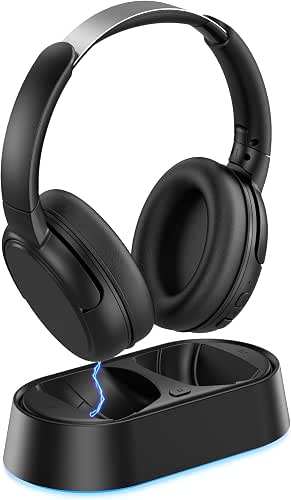

Does your older loved one seem to be turning the TV up louder and louder each time you visit? It might be time for TV headphones like these.
The Swiitech set lets them hear at their own volume while everyone else in the house gets some quiet. It also has a dialogue enhancement setting that favors voices, which is the part of a show that gets hard to follow as hearing changes.
Setup is about as simple as it gets. You plug the transmitter into the TV with one cable, and that’s it. No app, no pairing codes.
The charging dock pairs the headphones automatically when you set them down, and the battery runs for 24 hours. So they’re usually ready when someone wants to watch.
Now the catches. Your TV needs an optical, RCA, or AUX output for the cable connection. Bluetooth works as a backup, but it adds a step on older sets.
These are also tuned for TV speech, not music. If your loved one wants headphones for listening to albums, this isn’t the right pick.
RunStar Blood Pressure Monitor

This is an upper arm blood pressure monitor for home use. It has a large 4.2-inch tilted display, and it can also read your results out loud, which helps if eyesight or hearing is a problem.
The cuff fits arms from 8.6 to 16.5 inches around, and the monitor alerts you if the cuff isn’t on right. That matters, because a badly fitted cuff is one of the most common reasons for a wrong reading. It also flags an irregular heartbeat, which is worth mentioning to the doctor.
It stores 99 readings for each of two users, with date and time, so a couple can share one machine and you have a record to bring to appointments. It is FSA and HSA eligible, and it comes with a storage bag.
The trade-off: it takes a reading only when you start one, so it doesn’t watch anything in the background. It also needs batteries and you have to put the cuff on yourself, which can be hard with arthritis or limited hand strength.
Relish Simple Radio Player
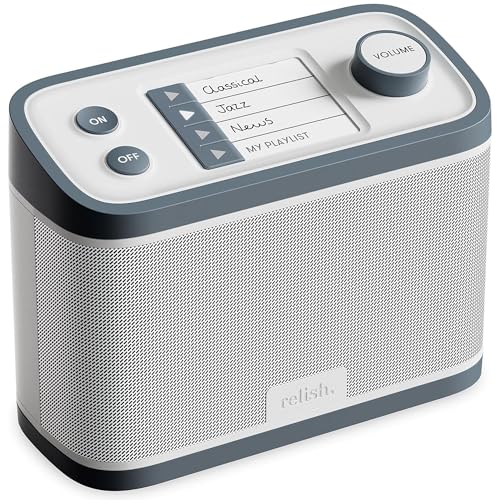
This nostalgia-inspired radio is specifically designed to be extremely easy to use. Even for seniors with dementia and Alzheimer’s.
It features an easy-to-use control panel with big buttons that are easy to see. The volume never goes completely off so that the user will know it’s still on. it’s lightweight and durable too!
Caregivers can program their favorite stations into the one-touch buttons on top allowing them to still have variety and choice in their music.
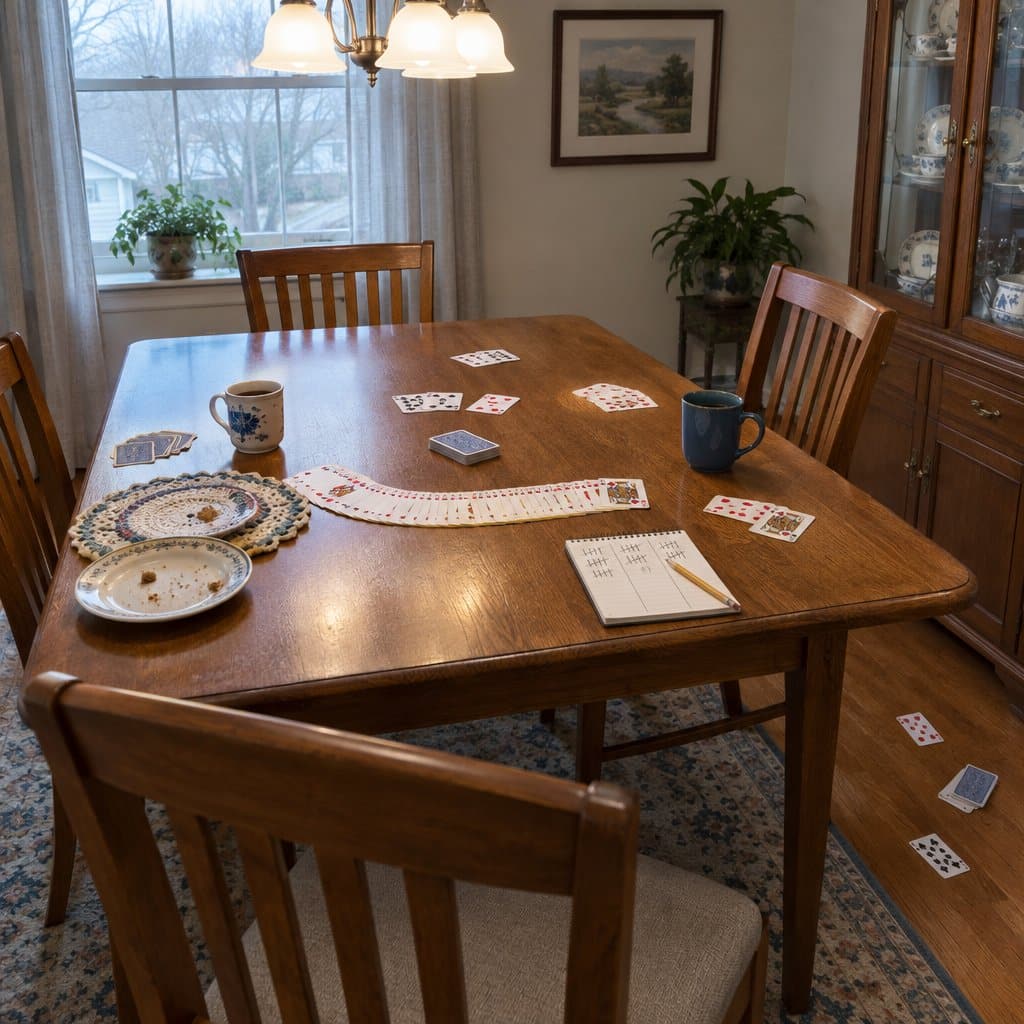
Automatic Card Shufflers for Seniors
Card night is a good way to spend an afternoon. Shuffling is the part that can spoil it. Shuffling asks a lot of the hands: gripping, bending the cards, and keeping them from spilling. If arthritis or shaky fingers are in the picture, that can make someone sit out a game they’ve played for decades. An automatic card shuffler does that one job for them. You put the cards in, press a button, and they come out shuffled.
Here’s what to look for. First, make sure it works with the cards your person actually plays with. Some shufflers only take one deck, and some take two. Check that it’s easy to press and that it stops on its own when it’s done. A quiet motor is nice too, since nobody wants a lawnmower at the table. Look at the power source as well. Rechargeable ones save you from buying batteries, but you do have to remember to plug them in. Also keep in mind that a shuffler won’t deal the cards, so someone still has to do that.
ShuffleBox Automatic Card Shuffler


This is an automatic card shuffler. You press one button, it shuffles in about two seconds, and it stops on its own.
It suits anyone whose hands make shuffling painful. With arthritis or limited dexterity, a deck of cards can turn into a chore, and this lets them stay in the game instead of sitting out. It works with poker, bridge, UNO and more, and the name says it’s ultra quiet.
It runs on a built-in rechargeable battery that charges through USB-C. You’ll need to plug it in every 5 to 7 sessions, so it helps to keep the cable nearby.
One limit: it holds two decks at most. If your group plays games with more decks than that, this one won’t keep up.

Talking Watches for Seniors With Poor Eyesight
A lot of electronic gifts are about comfort or entertainment. This one is about something simpler: being able to check the time without squinting. When eyesight gets poor, a regular watch face with small hands and thin numbers turns into a guessing game. A talking watch solves that. You press a button and it says the time out loud.
Here’s what to look for. You want one big, easy-to-find button, so there’s no hunting around or trying to remember a sequence. Check that the voice is clear and loud enough for someone whose hearing may not be what it was. It helps if the watch also gives the date and day, because those slip away from all of us. Setting the time by hand can be fiddly, so a watch that sets itself is a real plus. Just know that self-setting watches depend on a radio signal, and that signal doesn’t reach every house or area equally well. Also check what the watch is not built to handle, such as water, before you buy.
Hearkent Talking Watch for Visually Impaired
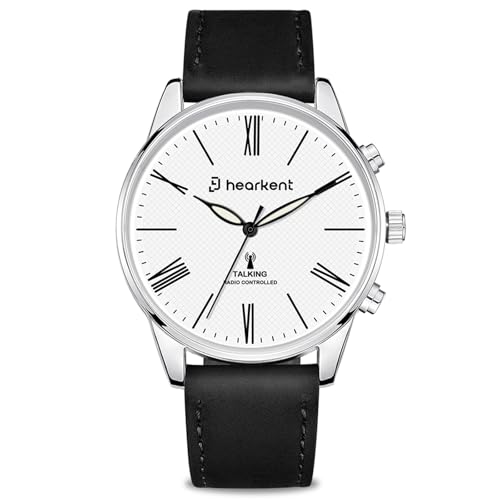

This is a talking watch. Press one button and it speaks the time, the date, and the day of the week out loud, in an American accent. For someone who can’t read a watch face well anymore, that saves a lot of squinting.
The part I like for older adults is that you never have to set it. It syncs itself to an atomic time signal every night, so no fiddling with a tiny crown after the first setup. It also has a clean Roman numeral face and a leather band, so it looks like a regular dress watch and not a medical device.
Two things to know. The signal can be spotty indoors or in more remote areas, so it may not stay in sync everywhere. And no water resistance rating is listed, so treat it as splash-sensitive. Take it off for dishes and handwashing.
General Electronic Gift Ideas for Seniors and the Elderly
1. Easy-to-Use Tablet
An easy to use tablet is a must for someone who is elderly. After all, a smartphone features way too small of a screen. A tablet offers the kind of screen real estate that your elderly parents would use.
Along with this, they will be able to use the tablet to do various things including shopping on the Internet, video chatting with their grandkids, and more.
A tablet is much easier to comprehend than a laptop or desktop. Therefore, it can be the perfect gift idea for someone who isn’t necessarily technically inclined. Best of all, it can be set up in a way that makes finding everything you need as easily as possible.
2. Video Doorbell
Someone who is elderly and living at home might have difficulty getting up and down and reaching the door in time. Because of this, a video doorbell can be one of the best possible gifts for them.
It will help them not only be alerted to when someone is at the door, but they will be able to check in on the video feed to see if it’s someone they know.
It will also allow for two-way communication to let the person waiting to know that they are on their way. A video doorbell paired with a tablet or smartphone can make an elderly person’s life much easier.
3. Smart Speaker
There is so much that can be done with a smart speaker. With the advancement in artificial intelligence, voice-powered assistants are much more useful than ever before.
If you have a Google Home or an Amazon Alexa at home, you can deliver all kinds of commands and you can ask various questions that can benefit anyone including someone older.
Not only are these assistants easy to use, but they can provide a lot of automation tasks that make your entire life easier. This is especially true when they are hooked up to other smart devices throughout the home.
4. TV Streaming Box
A lot of the cable boxes you will find available are extremely difficult to use and unnecessarily complicated. Whereas, you can find a lot of streaming boxes to be very intuitive and easy to use. This is especially true with a lot of them not featuring voice command functionality.
The ability to tell your remote or smart speaker to play a certain show on the TV makes for a very user-friendly experience.
A TV streaming box can be a great addition to an elderly person’s home because it can take the convoluted cable experience away from them and introduce them to something much simpler.

<a href="https://grayingwithgrace.com/electronic-gifts-for-the-elderly/"><img style="width:100%;" src="https://grayingwithgrace.com/wp-content/uploads/2022/11/Electronic-Gifts-for-Seniors.png"></a><br>Design by: <a href="https://grayingwithgrace.com">Graying With Grace</a>Wrapping Up
While knowing the ins and outs of some of these electronic devices can be difficult even for those who are technically savvy, these devices are meant to be user-friendly and accessible. Because of this, they can add a lot of usefulness to anyone’s life including someone who is elderly.
Whether your loved ones suffer from limited mobility or anything else, there are plenty of gadgets that can contribute to a much more accessible lifestyle.
The gift ideas above are only some of the best options you can consider the next time you are out shopping for the seniors in your life.